Eddystone简介ⅱ
3.How to set Eddystone-URL to Beacon device
Follow the steps below to add a new URL broadcast.


1. Open the FeasyBeacon and connect to the beacon device


2. Add a new broadcast.
3. Select the Beacon broadcast type
4. Fill in URL and RSSI at 0m parameter
5. Click Add.
6. Display the new added URL Broadcast
7. Click Save (Save the new added URL broadcast of the beacon)
8. 现在, the added beacon URL broadcast will show on Feasybeacon APP
评论:
Enable:  Circle one left, disable the beacon broadcast
Circle on Right ,Enable the beacon broadcast.
4 What is Eddystone-UID?
Eddystone-UID is a component of the Eddystone specification for BLE beacons. 它包含 36 十六进制数字由 20 十六进制数字名称空间ID, 12 十六进制数字实例ID和 4 十六进制数字RFU, 分裂成 3 组, 由连字符分开.
Eg.0102030405060708090一个-0B0C0D0E0F00-0000
每个 3 组必须包含以下字符数量:
第一部分: 20
第二部分: 12
第三部分: 4
字符应该是数字 0 到 9, 和从A到F的来信. 一个小组可以完全由数字或字母或两者的组合制成.
5 How to use Eddystone-UID
Eddystone-UID can be used with the Android system’s Nearby. First you have to create a UID that has not been registered by anyone else. Then make the UID setting for the beacon. And register it on Google’s server and associate the UID with the corresponding push information on the Google’s server. Once the configuration completed, when the android device turns on smartphone’s screen, nearby will scans the surrounding Beacon device automatically, and the corresponding push information will be displayed.
If iOS devices need to use Eddystone-UID, must install an app,because the IOS system does not provide direct support.
6 How to setting Eddystone-UID to Beacon device
Follow the step below to add a new UID broadcast.
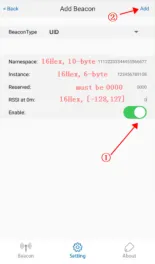


- Open the FeasyBeacon APP and connect to the beacon device.
- Add a new broadcast.
- Select UID broadcast type.
- Fill in UID Parameters.
- Click Finish.
- Display the new added UID Broadcast
- Click Save(Save the new added UID broadcast of the beacon)
- 现在, the added beacon UID broadcast will show on Feasybeacon APP